Sleep tracker for iPhone

Track your sleep like a habit.

Every night becomes one colored tile. Wake up to a sleep score, keep a streak of good nights going and see which habits cost you sleep, using the tracker you already wear.

Download on theApp Store
  • No account
  • No ads
  • Health data stays on your iPhone
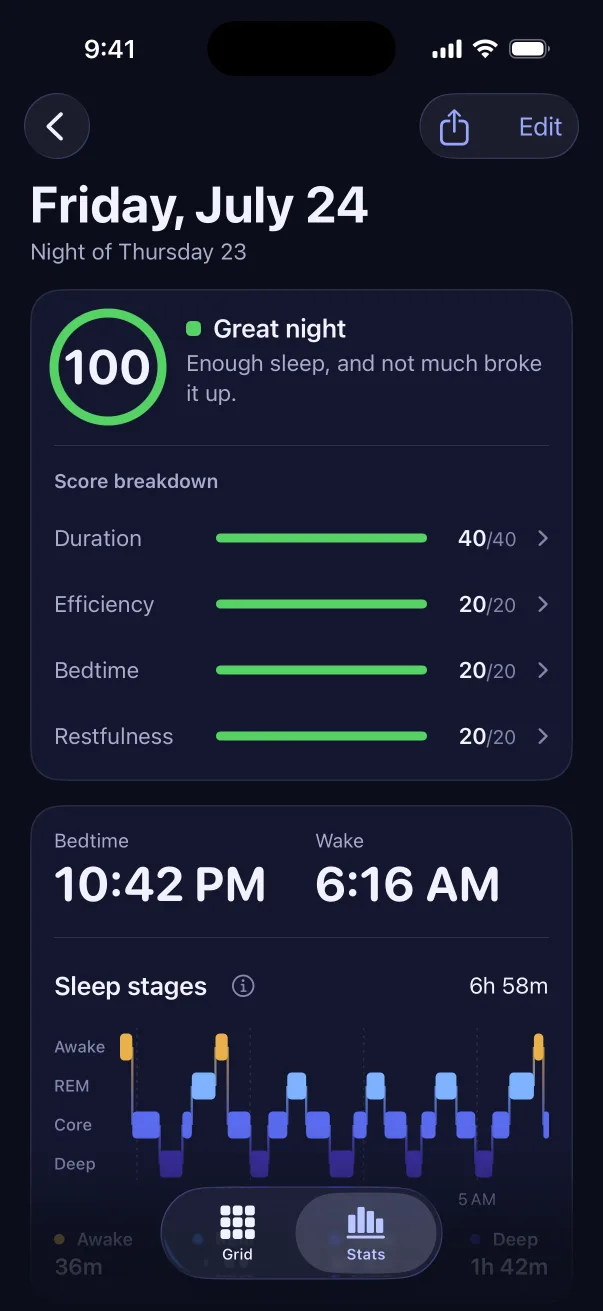
A night in Sleep Tiles with a score of 100 and a breakdown of duration, efficiency, bedtime and restfulness
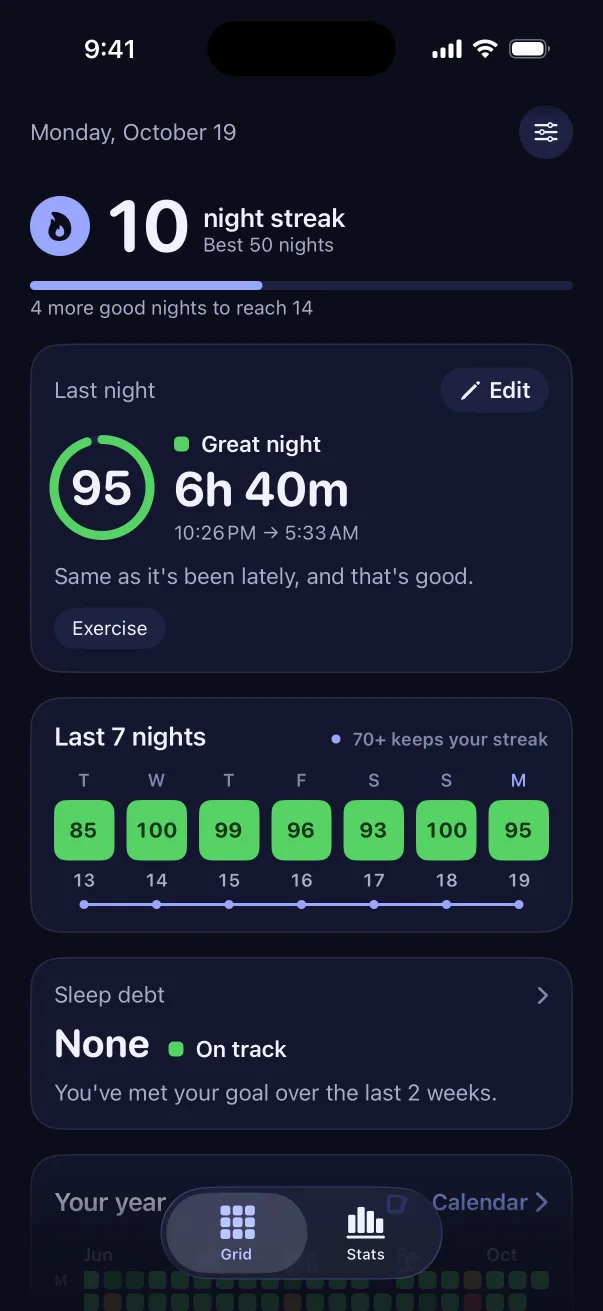
Sleep Tiles home screen showing a 10 night streak, last night's sleep score of 95 and the last 7 nights as green tiles
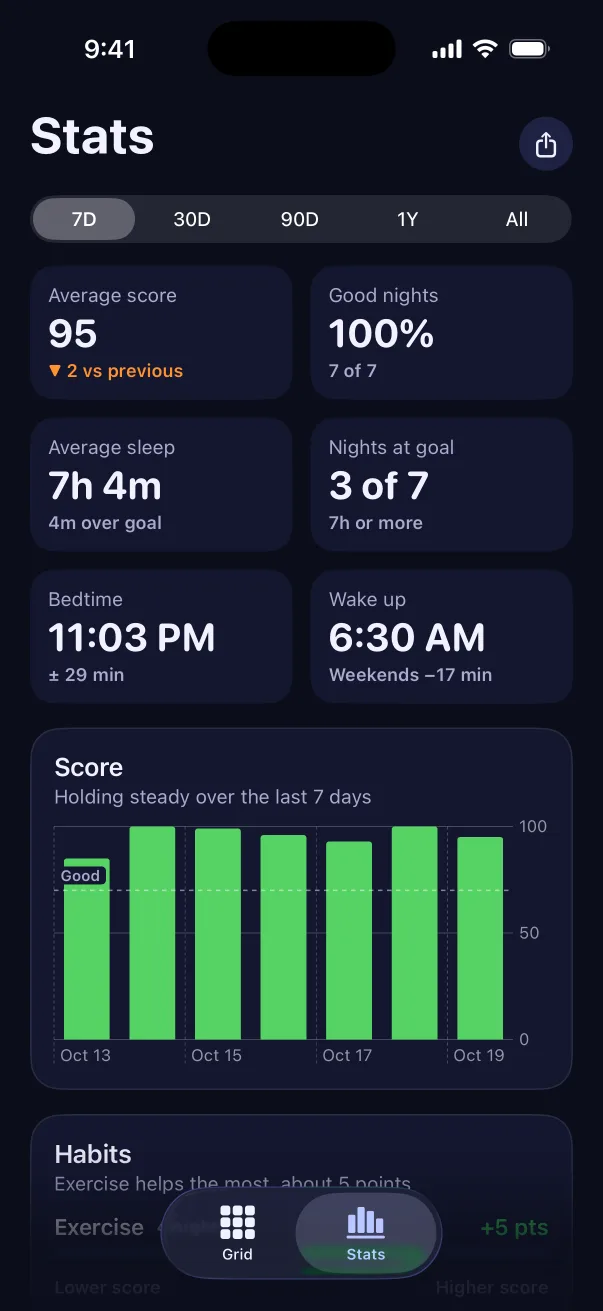
Sleep Tiles stats for the last 7 days with an average score of 95 and 100% good nights

Works with the sleep tracker you already wear

  • Apple Watch
  • Oura Ring
  • WHOOP
  • Garmin
  • Withings
  • Apple Health
  • Sleep apps
  • Manual logging

One tile a night

A year of sleep you can see at a glance

Green for a great night, red for a rough one. Your history from Apple Health fills in the moment you open the app, so your grid starts full instead of empty.

An example year in Sleep Tiles

Nights
0
Good nights
0
Night streak
0
Poor, under 50 Fair, 50 to 69 Good, 70 to 84 Great, 85 and up

How it works

Set up in a minute. Nothing new to wear.

  1. 1

    Connect Apple Health

    Sleep Tiles reads the nights your Apple Watch, Oura, WHOOP, Garmin or sleep app already saves. No tracker? Log a night by hand in a few taps.

  2. 2

    Wake up to your score

    Each morning your night gets a score out of 100, with the reason behind it: hours, efficiency, bedtime and restfulness.

  3. 3

    Grow your grid

    Good nights extend your streak and turn your year green. Tag your evenings to learn which habits help and which ones hurt.

Features

Everything you need to sleep better, and nothing you don't

A sleep score every morning, with the reason for it

Tap any night to see what earned points and what cost them, so a low score always comes with something to try tonight. Stages, heart rate, HRV, breathing and wrist temperature are there too when your watch records them.

How the score works
A night in Sleep Tiles: a score of 100 with a breakdown, bedtime 10:42 PM, wake 6:16 AM and a sleep stage chart

A streak that counts good nights

Every night that clears your bar adds to the streak. A rough night resets the count, never the tiles you earned.

  1. 3nights
  2. 7nights
  3. 14nights
  4. 30nights
  5. 60nights
  6. 100nights

Find the habits that cost you sleep

Tag late caffeine, alcohol, screens in bed, stress or exercise. Sleep Tiles compares your nights with and without each one, in points.

Exercise+14
Late meal−9
Screens in bed−21
Alcohol−30
Example: points gained or lost on nights with each tag

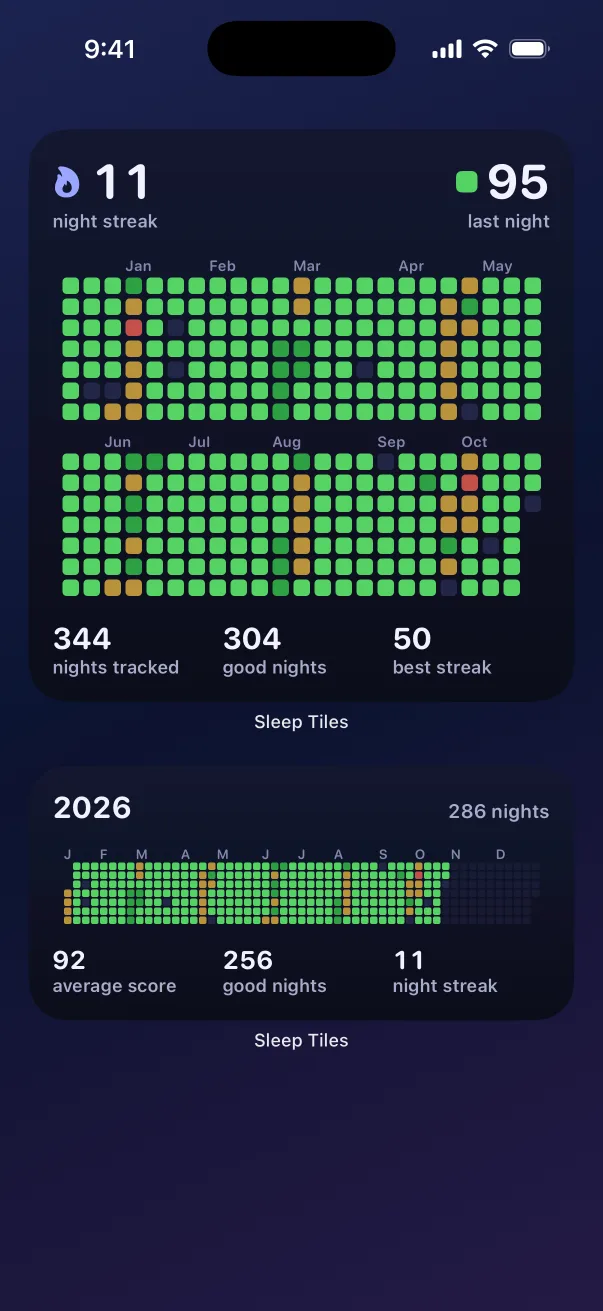
Sleep widgets for your Home Screen and Lock Screen

Your grid, your streak and last night's score, right where you look first thing. They update on their own each morning.

An iPhone Home Screen with Sleep Tiles widgets showing an 11 night streak, last night's score of 95 and a year of sleep tiles

Trends in plain English

Look back over 7, 30 or 90 days, a year or everything. Every chart opens with a sentence about what it shows: whether your score is climbing, how steady your bedtime is and which weekday treats you best.

Sleep Tiles stats for the last 7 days: an average score of 95, 100% good nights, 7 hours 4 minutes average sleep and an 11:03 PM bedtime

Sleep debt, and a bedtime to pay it back

See how far behind your goal you are over the last two weeks.

Sleep debt, explained

Your sleep stays on your iPhone

No account, no ads, no servers. Health data never leaves your phone, not even for iCloud. Export every night as CSV whenever you like.

Privacy policy

Fits your schedule

Set your own sleep goal, bedtime window and what counts as a good night. Night owls, early risers and shift workers all fit. Optional bedtime reminder and a Sunday recap.

Sleep score calculator

What would last night score?

Move the sliders to score a night out of 100 with the same formula the app uses. It runs on this page, so nothing you enter is sent anywhere.

Uses the default sleep goal of 8 hours and a bedtime window of 10:30 to 11:30 PM. You can change both in the app. The full formula is in how a sleep score is calculated.

88Great night
  • Duration30/40
  • Efficiency20/20
  • Bedtime20/20
  • Restfulness18/20

Counts toward your streak.

FAQ

Questions, answered

Anything else? See the support page or email us.

Does Sleep Tiles work with Apple Watch?

Yes. Turn on sleep tracking on your Apple Watch and Sleep Tiles reads each night from Apple Health, including sleep stages, heart rate, HRV, breathing rate and wrist temperature when your watch records them.

Does it work with Oura, WHOOP or Garmin?

Yes, as long as the tracker's own app saves sleep to Apple Health. Oura, WHOOP, Garmin Connect, Withings and many sleep apps can do this. These apps usually write to Health when you open them, so open your tracker's app in the morning and the night appears in Sleep Tiles. See the setup steps for each tracker.

Does Sleep Tiles record my sleep?

No. Sleep Tiles doesn't record sleep or wake you up. It reads what your watch, ring or sleep app saves to Apple Health. If you don't wear a tracker, you can log nights by hand.

How is the sleep score calculated?

Each night is scored out of 100: up to 40 points for sleeping your goal, 20 for efficiency (time asleep compared with time in bed), 20 for going to bed inside your bedtime window, and 20 for restfulness (deep and REM sleep plus few wake-ups). Without stage data, restfulness is left out and the other parts are scaled up to 100.

What counts as a good night for my streak?

A score of 70 or more by default. You can change the bar, your sleep goal and your bedtime window in Settings, so night owls, early risers and shift workers all fit.

Does Sleep Tiles have widgets?

Yes. There are Home Screen widgets with your year grid, your streak and last night's score, and Lock Screen widgets with your streak and the last 7 nights. They update on their own once your night reaches Apple Health.

Is my sleep data private?

Your sleep data stays on your iPhone. There's no account and no ads, and Health data never goes to iCloud or any server. Tags, notes and settings can back up to your own iCloud, end-to-end encrypted. You can export every night as a CSV file at any time.

How much does Sleep Tiles cost?

Sleep Tiles is free to download and needs a weekly or yearly subscription to use. Current prices for your country are shown in the App Store and in the app.

What is sleepmaxxing?

Sleepmaxxing means treating sleep as something you can train: a steady bedtime, enough hours and fewer habits that cut into your night. Sleep Tiles keeps score of it, one night at a time.
Start your grid tonight.

The nights already in Apple Health fill in the moment you open the app.

Download on theApp Store